CAGR Formula in Excel: 4 Methods With Examples
The CAGR formula in Excel is =(End/Start)^(1/Years)-1. With the start value in B1, the end value in B2 and 5 years, type =(B2/B1)^(1/5)-1. For 10,000 growing to 16,000, the answer is 9.86%. A shorter option is =RRI(5,B1,B2).
What is CAGR and how do you calculate it?
CAGR means compound annual growth rate. It is the one steady yearly rate that takes a value from its start to its end. Real growth goes up and down. CAGR smooths it into a single number you can compare.
CAGR = (End value / Start value)^(1 / Years) – 1
Here is the math for 10,000 growing to 16,000 in 5 years. Divide 16,000 by 10,000 to get 1.6. Take the 5th root of 1.6, which is about 1.0986. Subtract 1. CAGR is 9.86% a year.
How do you calculate CAGR in Excel step by step?
Set up your sheet like this. All examples on this page use these cells.
| Cell | Label | Value |
|---|---|---|
| B1 | Start value | 10,000 |
| B2 | End value | 16,000 |
| B3 | Years | 5 |
| B4 | CAGR | formula goes here |
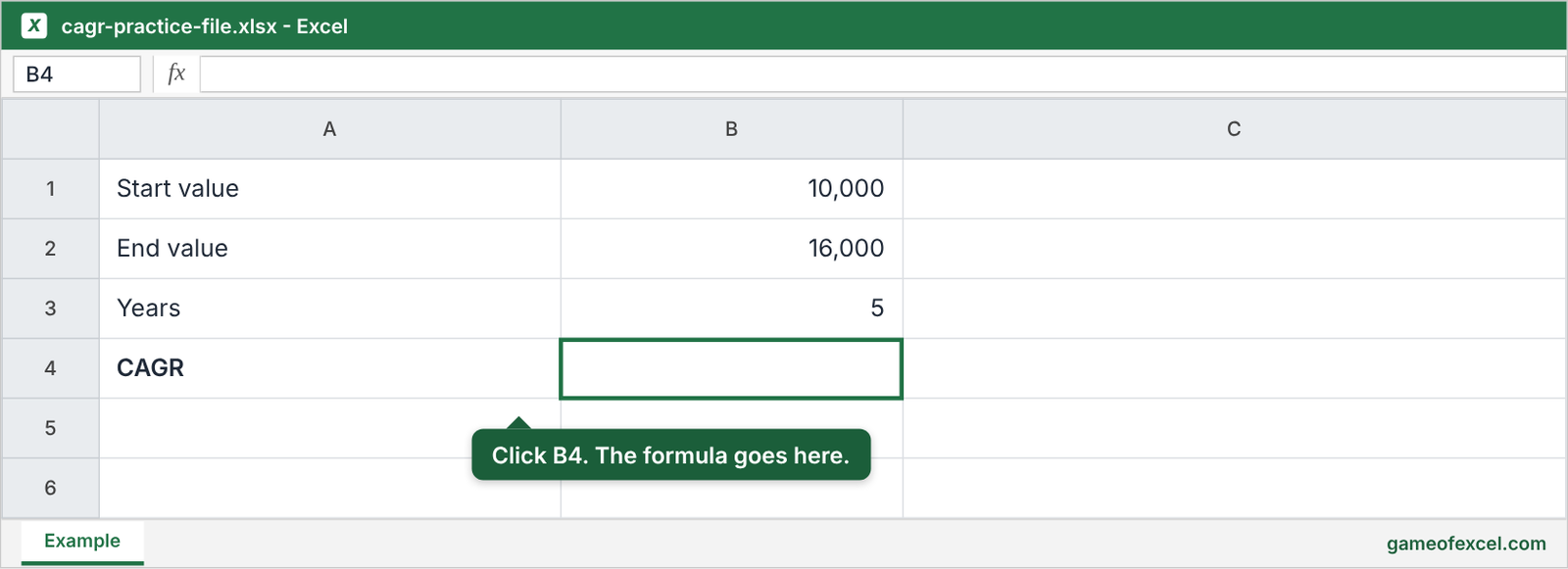
- Click cell B4.
- Type
=(B2/B1)^(1/B3)-1and press Enter. - Press Ctrl+Shift+% to show the result as a percent. It shows 10%.
- Click Increase Decimal twice. The cell now shows 9.86%.
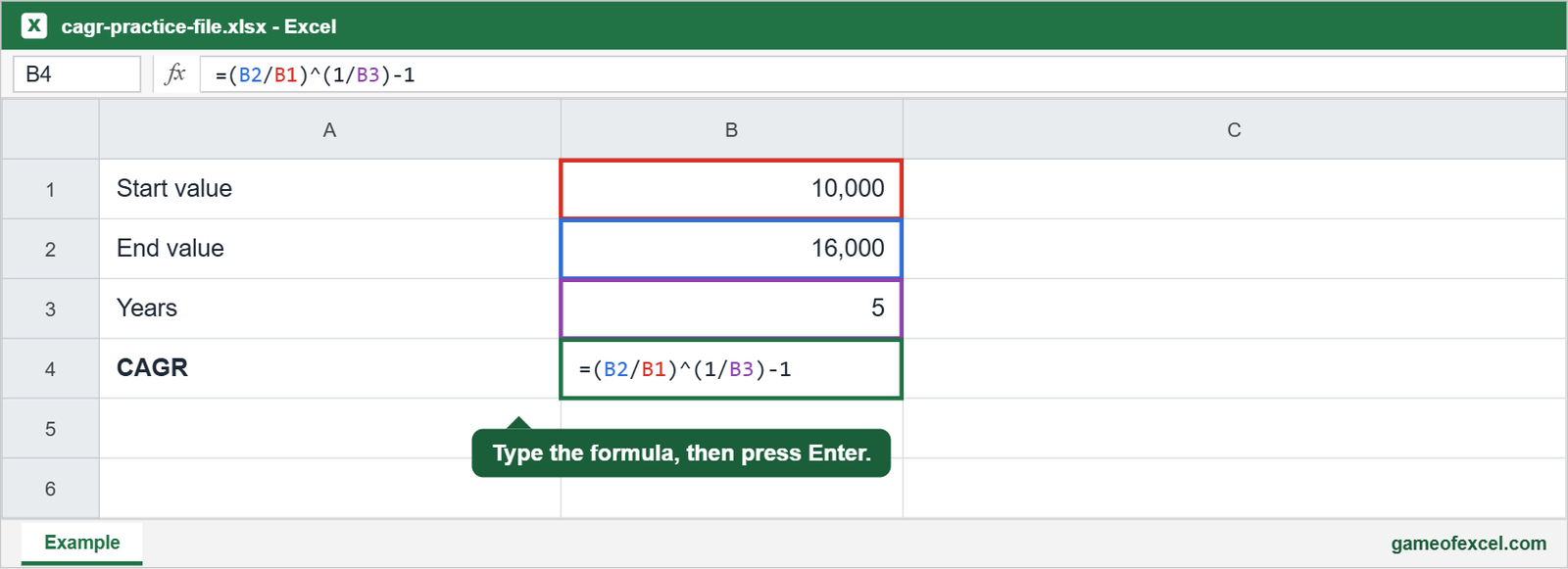
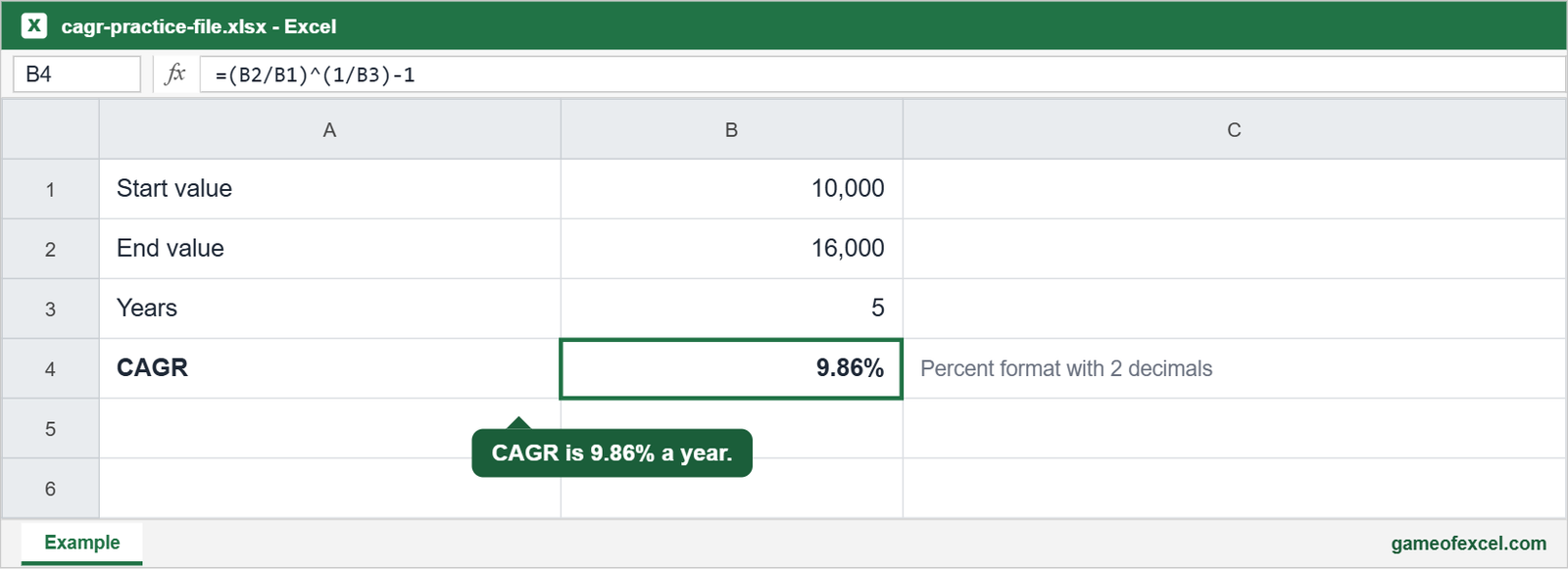
Keep the brackets. Without them, Excel works in the wrong order and gives a wrong answer. Use cell references instead of typed numbers, so the result updates when a value changes.
Want the answer without typing a formula? Use the free CAGR calculator. It also gives you the Excel formula to copy.
Does Excel have a CAGR function?
No. Excel has no function named CAGR. You use the formula above or the RRI function, shown next.
What are other ways to calculate CAGR in Excel?
Three more formulas return the same 9.86%.
| Method | Formula | Best for |
|---|---|---|
| Caret (^) | =(B2/B1)^(1/B3)-1 | Showing the math. Works in every version. |
| RRI | =RRI(B3,B1,B2) | The shortest formula. |
| RATE | =RATE(B3,,-B1,B2) | Older Excel versions. |
| POWER | =POWER(B2/B1,1/B3)-1 | People who prefer a function name. |
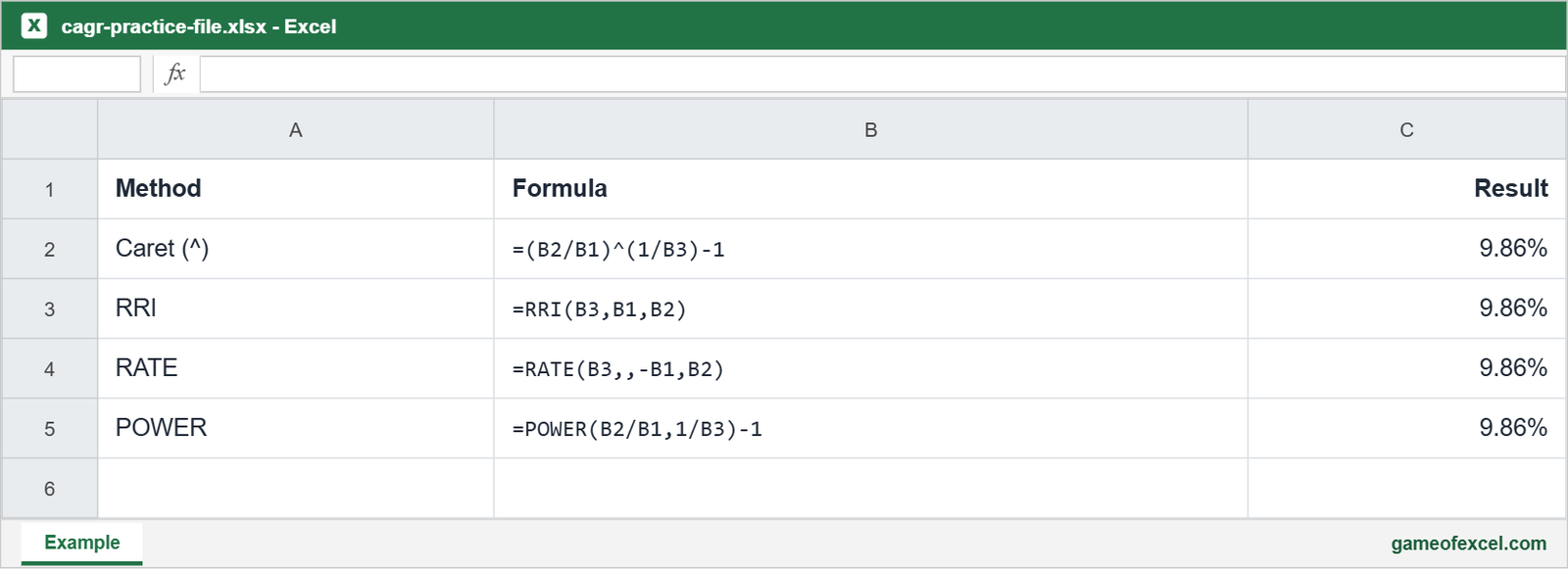
RATE needs the start value as a negative number, so the formula has -B1. The two commas skip the payment argument. RRI takes years, start value and end value in that order. Microsoft lists RRI for Excel 2016 and later.
Which CAGR method should you use?
- Caret formula: Pick this first. It works in every version and shows how the number is built.
- RRI: Pick this for the shortest formula if you have Excel 2016 or later.
- RATE or POWER: Pick these only if your file already uses them.
- XIRR: Pick this when dates are uneven or money is added during the period. See the rate of return section below.
How do you calculate CAGR for a time series like share prices?
Put dates in column A and prices in column B. If the first row is 2 and the last row is 100, use:
=(B100/B2)^(1/YEARFRAC(A2,A100))-1
YEARFRAC turns the gap between two dates into years as a decimal. A span of 2.5 years counts as 2.5, not 3.
How do you list the compounding periods?
Count the gaps, not the values. Data for 2019 to 2024 has 6 values but only 5 periods. So N is 5. Use =YEAR(end)-YEAR(start) to get it. If you use 6 by mistake, CAGR drops to 8.15% instead of 9.86%.
For months, divide by 12. A span of 18 months is 1.5 years.
How do you calculate CAGR for multiple start dates?
Give each row its own start value, end value and years. Write one formula and copy it down. If start is in B, end in C and years in D, the formula in E2 is:
=(C2/B2)^(1/D2)-1
If money goes in or out along the way, use XIRR instead.
How do you calculate the annual growth rate in Excel?
Divide this year by last year, then subtract 1:
=C2/B2-1
If B2 is 10,000 and C2 is 11,000, the result is 10%. Copy the formula down the column. For one rate across many years, use CAGR.
How do you skip zero values in year over year growth?
A zero in the earlier year causes a #DIV/0! error. Wrap the formula in IF:
=IF(B2=0,"",C2/B2-1)
The cell stays blank when B2 is zero. The AVERAGE function skips those blank cells.
How do CAGR and absolute return measure performance?
Absolute return is the total change. Use =(B2-B1)/B1. For our example, that is 60%. CAGR is the yearly rate, 9.86%.
Use absolute return to see how much you gained. Use CAGR to compare investments held for different lengths of time. A 60% gain over 5 years is much better than a 60% gain over 10 years.
To see how far your numbers spread around the average, read how to find variance in Excel.
How do you calculate the rate of return on an investment in Excel?
For one deposit and one ending value, use absolute return or CAGR. If you add or take out money on different dates, use XIRR:
=XIRR(values,dates)
Enter deposits as negative numbers and the final value as a positive number. The dates must match the values one for one.
How do you calculate monthly growth from CAGR?
Take the 12th root of 1 plus CAGR, then subtract 1:
=(1+B4)^(1/12)-1
For 9.86% CAGR, monthly growth is 0.79%. Do not divide 9.86% by 12. That gives 0.82%, which is too high.
How do you calculate N from CAGR?
Use the LN function:
=LN(B2/B1)/LN(1+B4)
Or use NPER:
=NPER(B4,0,-B1,B2)
Both return 5 years. Use this to find how long a value needs to reach a target at a known rate.
How do you forecast when you know the CAGR?
Multiply the current value by (1 + CAGR) for each year ahead. To look 3 years past 16,000:
=B2*(1+B4)^3
The result is 21,213. This assumes growth stays steady. Real results will differ.
For trend based forecasts, see how to forecast in Excel.
How do you calculate CAGR with negative or zero values?
CAGR needs a positive start value and a positive end value. A start value of 0 gives #DIV/0!. A start and end with opposite signs gives #NUM!. In those cases, report the total change instead.
A falling value is fine. If 10,000 drops to 7,500 over 5 years, CAGR is -5.6%.
Does the CAGR formula work in Google Sheets?
Yes. The caret formula =(B2/B1)^(1/B3)-1 works the same way in Google Sheets.
What else can LAMBDA do besides CAGR?
LAMBDA lets you save a formula as your own function. In Name Manager, create a name such as CAGR. Set what it refers to as:
=LAMBDA(start,end,n,(end/start)^(1/n)-1)
Then type =CAGR(B1,B2,5) in any cell. Use the same idea for any formula you repeat, such as a discount or tax calculation. Check that your Excel version includes LAMBDA.
What are the limits of CAGR?
- It hides ups and downs. 10,000 to 16,000 over 5 years gives 9.86% whether growth was steady or the value fell to 6,000 in year 2 and then jumped.
- It uses only two values. The first and last values decide the result.
- It is not a forecast. A past rate may not repeat.
- Periods must match. Compare CAGRs only over the same time span.
Practice challenge
Try this in Excel. The start value is 25,000, the end value is 40,000, and the span is 4 years.
- Find CAGR with the caret formula.
- Check it with RRI.
- Find the monthly growth rate.
- Forecast the value 3 years after 40,000.
Answers: CAGR is 12.47%. Monthly growth is 0.98%. The forecast is 56,905.
Download the free CAGR practice file. It has no signup. More free tools are on the Game of Excel tools page.
CAGR in Excel: quick answers
- Shortcut: There is no keyboard shortcut. RRI is the shortest formula.
- Percent format: Press Ctrl+Shift+%.
- 4 or 5 year CAGR: Change the number of years in the formula. Nothing else changes.
- Number of years: Subtract the start year from the end year.
- Months: Divide the months by 12.
Every result on this page was checked by calculation with the example numbers.